CharaVerse practical guides
AI Roleplay Memory: Review, Correct and Continue Your Story
Keep a long roleplay easier to follow: review the story so far, correct a mistaken detail and resume from a clear next action. This guide explains CharaVerse’s current controls and their limits.
By CharaVerse · Updated
A filled-in recap you can adapt
Original fictional example, not a captured conversation: “We are outside the observatory after sunset. I am the visiting cartographer; Mira is the archivist. She trusts me to inspect the entrance, but not to break its seal. Mara still has the silver key at the harbor. We need to identify the visitor before the archive closes. Correction: I do not have the key. My last action was to examine the brass panel. Continue from there and leave my decisions to me.”
This example preserves a location, relationship, established fact, unresolved goal and last action. It does not restore an old transcript or prove that a model will remember them. Check the next reply against these facts.
Chat history is not the same as usable memory
A saved transcript keeps messages you can revisit. A reply is generated from a limited selection of context, so a detail being present in your history does not guarantee the character will use it correctly.
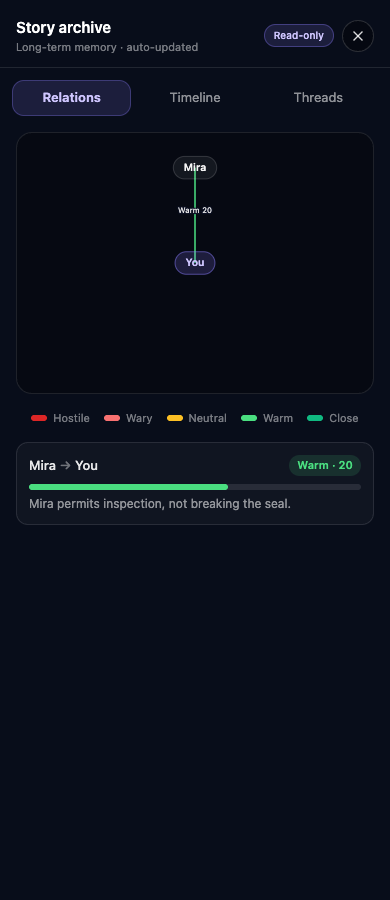
On CharaVerse, Story Archive organizes relationships, timeline events and open threads for signed-in conversations. It supports continuity; it is not a complete transcript, a perfect record or unlimited memory. Updates can lag or miss an event.
Review Story Archive before continuing a long scene
Sign in and reopen the existing conversation you want to continue. After a few exchanges, use the Story archive control in the chat header. The panel is read-only; it is not an editor for changing remembered facts.
- Open Relations to check the people and relationship changes that matter to the scene.
- Open Timeline to review important events. Compare a surprising entry with the original messages instead of treating the summary as ground truth.
- Open Threads to look for unresolved goals and conflicts before introducing a new plot.
- If the archive is empty or incomplete, return to the conversation and supply a brief recap of the facts needed for the next reply. Do not assume that an empty tab means your saved messages were deleted.
Correct one mistaken fact, then check the next reply
Separate an established fact from a new action. State what was wrong, what is correct and where the scene should resume. A short correction is easier to check than a long list of unrelated instructions.
Original example: “Small correction: we left the silver key with Mara at the harbor. I do not have it now. Continue from the locked observatory door, and let me decide how to enter.”
Read the next reply before advancing the plot. If it still uses the wrong fact, shorten the correction or clarify it again. Sending a correction does not guarantee that the archive is immediately rewritten or that every later reply will follow it.
Resume after a break without restarting the whole story
Use the same saved conversation when you want its existing context. Mention the current location, the immediate objective and one unresolved promise. Avoid pasting an entire transcript when only a few facts are relevant.
Original example: “We are still outside the observatory after sunset. Mara has the key, and we promised not to break the seal. I examine the brass panel beside the door. What does your character notice?”
A recap in a new chat supplies context for a new conversation; it does not restore previous messages, timestamps or branches. Keep a separate private backup when those records matter.
A short roleplay memory template
Select and copy this template into your own notes, replace the placeholders and send only the relevant part yourself. Use fictional story details, not passwords, contact information or other sensitive personal data.
The template is an original writing aid, not a recorded chat or a guarantee of model behavior. Reuse it when the scene changes; you do not need to repeat every field on every turn.
Current place and time:
My role and the other character's role:
Our current relationship:
Two or three established facts that matter now:
The current goal and the unresolved obstacle:
Correction, if needed: [incorrect detail] should be [established fact].
The last action to continue from:
Continue from this point. Leave my character's thoughts, dialogue and decisions to me.
Use scene controls for their intended purpose
When Story mode is available, Say is for your character’s dialogue, Narrate supplies scene direction, and Canon supplies agreed events. Use the mode control in chat to choose the appropriate input style. These controls guide the scene; they do not make memory infallible.
For an ordinary correction, a clear message is enough to try first. Do not claim an event already happened just to force the other character’s response. Leave room for the character to react and for your own choices to remain yours.
Frequently asked questions
Can I edit Story Archive directly?
No. The current archive panel is read-only. Explain a correction in the conversation and check the next response; automatic archive updates may not immediately reflect your correction.
Does Story Archive remember every message forever?
No. It summarizes selected story state and supplies limited context. It may omit details or make mistakes. Keep your own private notes for essential facts.
Do I need an account?
Story Archive and saved conversations require sign-in. You can try guest chat within usage limits, but do not rely on it as a permanent story backup. Optional paid features have their own conditions.
Will pasting the template import my old chat?
No. A recap is context, not a chat import. It does not recreate original history, timestamps, branches or another platform’s model behavior.
What if a correction still does not work?
Reduce it to the fact needed now, distinguish it from a new action, and check the next reply. If the result still does not fit, revise the scene or pause. This guide cannot guarantee a particular reply.
Choose your next scene
Already have a story? Return to that saved conversation in Chat History. To start something new, choose a character below.